

DISCLOSURE: Some of the links in my posts are affiliate links, meaning that at no additional cost to you, I will earn a commission if you like my recommendation and then click through and make a purchase. Details...
Your social networks are an extension of your brand. The best practice is to use the same name across all channels.
For example, Facebook allows you to have a customize the website address for both your PERSONAL PROFILE and your PAGE. It creates a shorter address in the format www.facebook.com/____________.
However, without reading following the tips below, you might get stuck with a name that is not in line with your brand.

Follow the steps of PLAN, BRAND & COMMUNICATE:
The PLAN part here starts with making a decision about what your “username” will be across EVERY SOCIAL MEDIA SITE AND YOUR WEBSITE. I’m Virtuallinda EVERYWHERE online. I made this decision back in 1998 and have consistently secured this username at every new site – and got the domain name to match.
The reason is that it’s about my BRAND everywhere, not just on Facebook. The username becomes part of my business identity and I use it to COMMUNICATE on every bit of marketing I do both online and in-person. You want people to easily remember your URL and not have different usernames for different sites. Imagine promoting it in passing at a networking event. I say “I’m Virtuallinda on every social site.” My URL is also www.virtuallinda.com.
Pretty easy to remember, right?
Selecting a username for use everywhere online
In order to select a username, consider what your business is now and where it it going. For example, had I selected “CirquelWebDesign” (my old business name) then I would have been limited as I expanded my business. Instead, I focused on my personal brand as Virtuallinda.
On Facebook, you also can create a shortcut to your personal profile. I selected my name, so it is www.facebook.com/linda.schenk. I have the URL of www.lindaschenk.com which you can forward to your website or use with a very simple “profile hub” which will link to your other profiles.
If you have several businesses, lock down the usernames for ALL of them, even if you don’t use them as your main account. It’s better to have one and not promote or use it than let your competition steal it. They will.
Technical TIPS:
- Select a consistent username that is 15 characters or less. Some social networking sites, such as Twitter, max out at 15 characters. You may have to get creative. For example, Social Media Works became “socialmediawrks”.
- I highly consider also getting a URL that is the same as your username. Use this for BOTH a website AND an email address to further establish your online identity.
- Quickly check what is available at www.knowem.com. If the name you want isn’t available on the main sites, select another one!
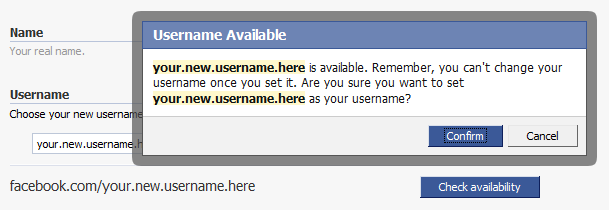
- On Facebook, visit www.facebook.com/username to select your name. This can only be changed ONE TIME, so choose wisely! This is where the planning is critical – no sense in getting a great URL at Facebook and having your competition having it elsewhere!
- If you need to change your username, follow these instructions.
- On Facebook, you can add dots like my linda.schenk to separate words. These don’t need to be typed in. Personally, I think you can skip this because it’s not standard elsewhere. I would be fine as www.facebook.com/lindaschenk or even www.facebook.com/l.i.n.d.a.s.c.h.e.n.k
This is a very important decision and if you need more help than just reading this blog post, schedule a Marketing QuickHelp session!.
Afraid you won’t get this setup correctly?
Often I do “clean up” with my clients because they have read something online that they then follow and it doesn’t optimally set themselves up.
For example, had you just followed the instructions of “go to www.facebook.com/username” and typed something in, you could have chosen a name that you might not be happy with now.
This is the value of working with a Social Media Strategist.
I have 23+ years of experience in web design, technology, strategy, branding and marketing online. I can’t possibly write instructions that will cover all of my knowledge. I use this to give specific advice to my clients. I can point you in the right direction and make sure that you don’t make critical mistakes. I will do the more difficult parts of technical setup combined with DIY instructions for maintaining and using the sites.
Getting tech expertise is an INVESTMENT in your business.
Your business will be online for many, many years to come. It’s not worth taking a risk of building a shaky foundation. Think of your brand as a house. The blueprints and foundation are what make that house stable and easy to expand.
These tips & more are included in Social Media Setup services.
I also have a few other tricks that are not included here (a girl has to keep some secrets, right?) Other social networks have tricks that I use to best setup them up. I have a process that use that is quick for me to do, but it would take you at least a valuable hour of your time to sort through the many steps I take.
But even more important, creating your brand online is a HUGE decision.
The full process I use for all my clients starts with your business goals. We will work through a “PLAN, BRAND and COMMUNICATE” process to assure that you are ACTING when making decisions about your brand, not REACTING to reading one quick tip.
Hello Service-Based Entrepreneur,
I know it’s easy to get overwhelmed by reading blog posts full of ideas, tactics & tools. Be honest...
- How frustrated will you be trying to implement this on your own?
- How much time will you waste if it's not your next best step?
- Did you just take the time to read this but you won't make any changes?
- Or are you ready to take a small next step to build your brand?
Get clarity & your next step forward!
I'm here to help you with your marketing for the new normal & beyond. Let's talk about your options to work with me on a FREE 30-min call.
To your success,

Marketing Strategist & Designer
I offer a blend of 30+ years of expertise in marketing, websites, brand identity, strategy, tech solutions, and more.
I work with service-based entrepreneurs with a practical and flexible approach to adjust to changes in business & life. Let’s talk about how we can work together to start & grow your business.